ko-mono-20 user guide
ko-mono-20 is the Korg MS-20, its whole circuit from the service manual, so its controls, patch panel and ESP work as the unit's do and the owner's manual applies. This guide covers what the plugin adds. Installing is on the download page, and the ROM folder, artwork files, the update check and contact are on Support.
Getting started
The first start
ko-mono-20 is a circuit with no firmware, so it needs no ROM. A new instance starts as a unit that's been on a while, with no cables in and the Rev 1 filter board. It plays without cables, because the patch panel's inputs are wired to their usual sources until you plug something in, as on the unit.
Panel artwork
The blank place for the KORG logo, bottom right, takes an SVG or PNG of your own, named as below, anywhere in the ROM folder (how artwork files work). ROMs in the top bar shows whether it found one. There's no model name on the front of an MS-20.
| File | Place | Size |
|---|---|---|
| ko-mono-20-maker.svg or .png | The KORG logo, bottom right | 39.0 × 12.3 mm |
The plain name maker.svg in artwork/ms20/ works too.
The panel
The MS-20's front panel, measured from photos. Everything on it works as on the unit except PHONES.
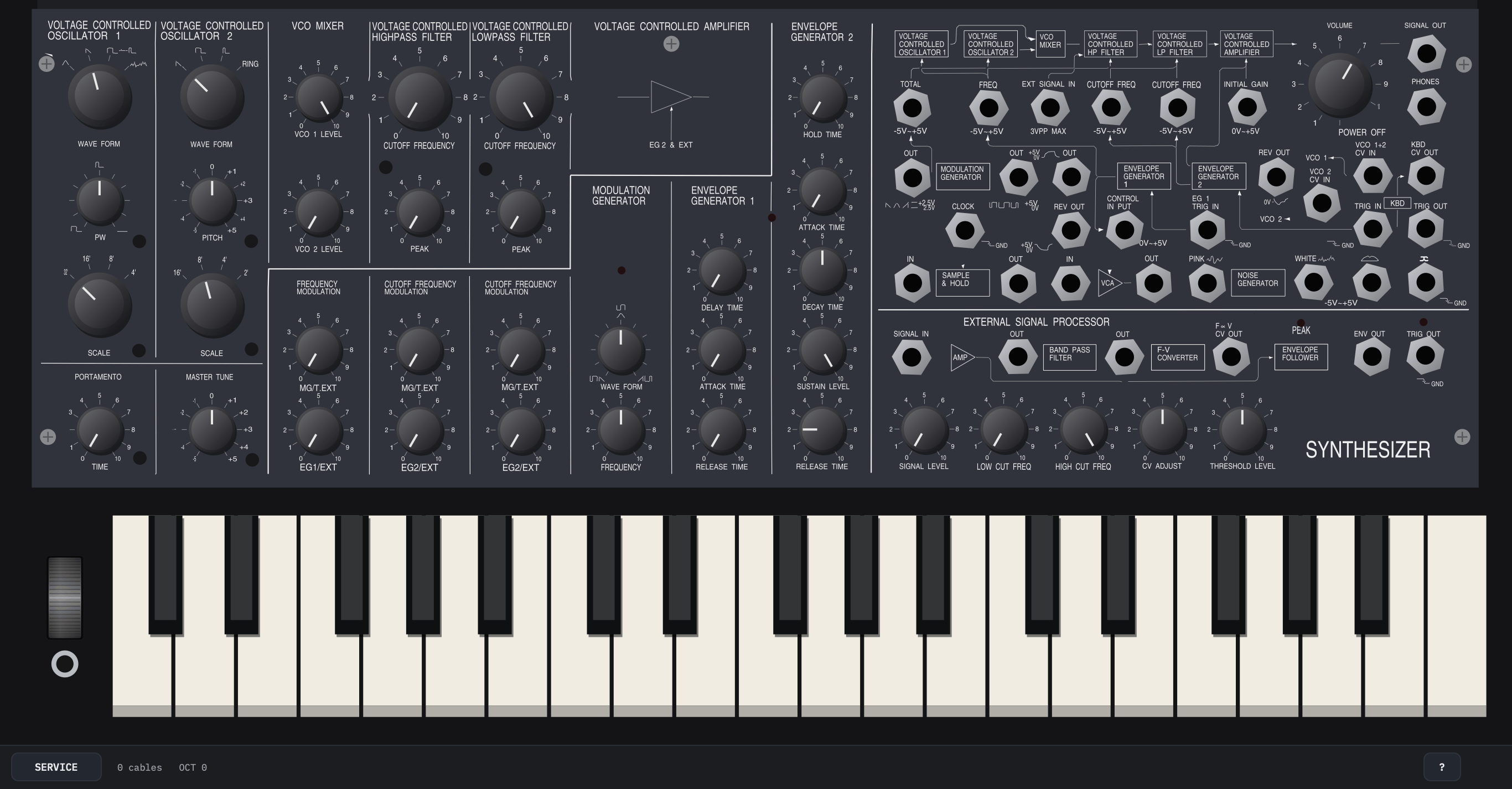
Its sections
- VCO 1, VCO 2, the VCO MIXER and FREQUENCY MODULATION - the two oscillators, their levels and how far the MG and EG 1 move their pitch, with PORTAMENTO and MASTER TUNE under them.
- The filters - the HPF and the LPF, each with its CUTOFF FREQUENCY, PEAK and two modulation amounts.
- MODULATION GENERATOR, EG 1 and EG 2 - the MG and the two envelopes, with EG 2 on the VCA.
- The patch panel - 35 jacks and VOLUME (see The patch panel).
- EXTERNAL SIGNAL PROCESSOR - the ESP, which turns an audio input into a pitch CV, an envelope and a trigger.
The patch panel
Drag from one jack to another to patch a cable, an output into an input. One output can feed several inputs, and a cable in an input takes over from what's wired there, as on the unit. Drag a plug out of an input to move or pull its cable, or right-click a jack to pull all its cables. The bottom bar counts the cables.
The keyboard and the wheel
The 37 keys run from C3 to C6, so at 8' a key sounds at its MIDI pitch. Like the unit's resistor ladder, the keyboard plays the highest key held, and legato never retriggers the envelopes.
The control wheel stays where you leave it, and the session saves it. The momentary switch under it is held down with the mouse or the 1 key.
POWER OFF
VOLUME's counter-clockwise click is POWER OFF, as on the unit. Turn VOLUME up out of it and the MS-20 starts from cold, with its capacitors charging and EG 2 firing once, which makes a thump (quiet at the low VOLUME the switch leaves). Turn it back into the click and the sound dies with the power rails.
Opening a session or a new instance isn't a power-on, so ko-mono-20 starts settled, as if it had been on a while.
The bars
The top bar
- BETA - this version is a beta, and About shows the version.
- ROMs - the ROM folder and the artwork, with their full paths, and Show, Change… and Rescan for the folder.
- State - see State.
- About - the version, the ROM folder and artwork in use, the update check, and links to this guide, the site and the forum. A newer version shows as a button in the bar.
State
- Save to file… - saves the instance, with the knobs and switches, the cables, the wheel, the filter board and whether it's switched on.
- Load from file… - loads one.
- Reset… - makes it a new instance, as at the first start.
The bottom bar
- SERVICE
- Opens the service card, with CIRCUIT (SERVICE).
- Status
- How many cables are in, which jack has your DAW's audio, and the computer keys' octave (OCT). While keys are latched it shows those instead, and while the unit is off, POWER OFF.
- ?
- Shows the list of computer keys over the panel. Any click, ? or Escape closes it.
SERVICE
CIRCUIT picks the filter board, as a unit has one or the other. REV 1 is the two KORG35 modules the service manual draws, and REV 2 is the later KLM-307, with LM13600 filters and its own VCA. Switching restarts the circuit settled, and the session keeps the board.
MIDI and your DAW
MIDI
The MS-20 has no MIDI, so the plugin plays its keys from MIDI notes. C3 to C6 play the 37 keys, and notes outside that fold in by octaves. Pitch bend moves the control wheel.
Audio in
Route a track to the plugin's side-chain and it becomes a cable from outside. Click EXT SIGNAL IN to plug it in there, into the filters, or ESP SIGNAL IN to send it through the ESP, and click again to pull it out. The bottom bar says where it is, and whether your DAW has the input switched off.
Automation and sessions
Every knob and switch on the panel can be automated. A session saves the instance as State does, and reopened, it carries on settled where it was, with the same cables and filter board.
When it has gone quiet the circuit sleeps, and the output is exact zeros. ko-mono-20 reports a 40 s tail.
Keyboard and mouse
- Knobs - drag up or down, with Shift for fine steps, or scroll. Double-click for the start position.
- Rotary switches - click for the next position, Shift-click or right-click for the one before, or drag round to one.
- Keys - click, or slide along them to play them in turn. A right-click holds a key down until you click it again.
- The wheel - drag up or down, and double-click to centre it.
- A W S E D F T G Y H U J K O L P ; ' - the keys from C4 (at OCT 0). Z, X - octave down and up, -1 to +1. 1 - the momentary switch.
- ? - shows the key list. Escape closes it, lets go of held keys and drops a cable being drawn. Click the panel first, and Space goes to your DAW.
- Window - drag the bottom-right corner.