ob-poly-xp user guide
ob-poly-xp is the Oberheim Xpander running its own firmware, main software 1.2 and voice software 1.4: its pages, patches, modulation and MIDI are the unit's, and the Xpander owner's manual applies. This guide covers what the plugin adds. Installing is on the download page; the ROM folder, artwork files, the update check and contact are on Support.
Getting started
The first start
The first time ob-poly-xp runs on a computer, it does what a new Xpander did: it clears its memory (RESET MEMORY) and tunes its six voices (TUNE ALL). That takes about 20 s of CPU in the background, and the bottom bar says TUNING. With the factory patches in the ROM folder it then loads them through its MIDI input and starts on single patch 00. The result is kept in Lemus's application folder, so later instances start at once.
The ROMs
The firmware is in six 8 KB EPROMs, none of them included: MAME's xpander set, with MAME's names. Put them in the ROM folder (how the ROM folder works). Without all six, ob-poly-xp makes no sound, the bottom bar says ROMs missing, and ROMs in the top bar shows which.
| File | Size | SHA1 | What |
|---|---|---|---|
| exp1.2-0.u8 | 8 KB | 4064edc2fa0bea62684c28e8e004feb8229604fe | main ROM 0 (software 1.2) |
| exp1.2-1.u7 | 8 KB | 233efc3da3a96777b10a4d6fe7e80864e9231f04 | main ROM 1 |
| exp1.2-2.u6 | 8 KB | 798c1b28fb59819baadbf0142ecd1348e759fa70 | main ROM 2 |
| exp1.2-3.u5 | 8 KB | 5897ad0cd66cf37b8e9b277654aab4eb83d1c8ab | main ROM 3 |
| ca1.4-0.u912 | 8 KB | 5ab13ccc3b75df313a447520ca54a492102b7e3b | voice ROM 0 (software 1.4) |
| ca1.4-1.u914 | 8 KB | 951bbc197a0140a93bb7621a7aedbe0f4037990c | voice ROM 1 |
The factory patches
Optional: Oberheim's 100 factory single patches as a SysEx dump, FACTORY1.SYX (39,900 bytes, SHA1 b8abde65cff74424438fd371eb2261c2e70ccaa8), in the ROM folder. A new instance then starts with them, as a new unit did. Without it the single patches start blank, as RESET MEMORY leaves them. Patches sent to ob-poly-xp over MIDI later are stored as on the unit; SYSTEMX must be on (MASTER PAGE, MIDI, ENABLES).
Panel artwork
The two blank places at the lower left of the PROGRAMMER section take an SVG or PNG of your own each, named as below, anywhere in the ROM folder (how artwork files work). The rear repeats them from the same files. ROMs in the top bar lists them with what each has, opens the folder with Show its folder, and reads it again with Rescan.
| File | Place | Size |
|---|---|---|
| ob-poly-xp-maker.svg or .png | The Oberheim logo | 59.2 × 10.5 mm |
| ob-poly-xp-name.svg or .png | The Xpander logo under it | 78.8 × 20.3 mm |
The plain names (maker.svg…) in artwork/xpander/ work too, and win over these.
The panel
The Xpander's front panel, measured from photos. Everything on it works as on the unit; the owner's manual explains the pages.
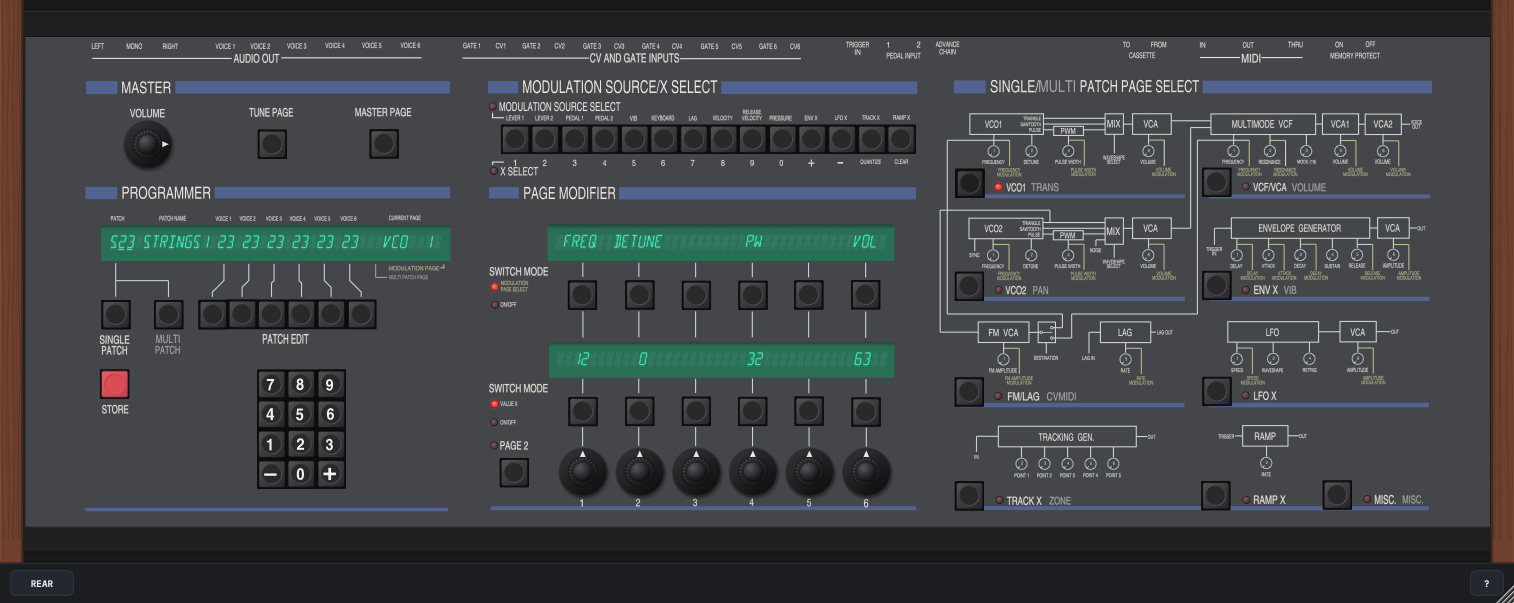
Its sections
- MASTER: VOLUME, TUNE PAGE (TUNE ALL and the single tunes) and MASTER PAGE (MIDI, chains, CV/MIDI, zones, the service pages).
- PROGRAMMER: the patch display, SINGLE PATCH and MULTI PATCH, PATCH EDIT 1–6, the keypad and STORE.
- MODULATION SOURCE/X SELECT: the sources to add to a parameter (the levers, pedals, VIB, KEYBOARD, LAG, velocity, pressure, ENV X, LFO X, TRACK X, RAMP X), and the numbers that pick which ENV, LFO, TRACK or RAMP.
- PAGE MODIFIER: the two displays, the soft keys above and below them, PAGE 2 and the six encoders.
- PAGE SELECT: the pages of a voice: VCO1, VCO2, FM/LAG, TRACK X, VCF/VCA, ENV X, LFO X, RAMP X and MISC.
The rear
REAR in the bottom bar turns the unit round. POWER switches it: off, it is silent and keeps its battery RAM; on, it boots from it. MEMORY PROTECT slides ON or OFF: on, the patches can't be written, as on the unit. The jacks are drawn as the unit has them; see Outputs and Pedals over MIDI.
The bars
The top bar
- BETA after the name: this version is a beta. About shows the version.
- ROMs: the ROM folder, the six ROMs, the factory patches and the artwork, with their full paths, and Show, Change… and Rescan for the folder.
- State: see State.
- About: the version, the ROM folder and artwork in use, the update check, and links to this guide, the site and the forum. A newer version shows as a button in the bar.
State
- Save to file… saves the instance: the whole battery RAM (patches, tune, settings), VOLUME, POWER and MEMORY PROTECT.
- Load from file… loads one.
- Reset… makes it a new instance: the factory state, with the factory patches if they are in the ROM folder.
The bottom bar
- REAR
- Shows the rear panel, with POWER and MEMORY PROTECT to click (The rear).
- Status
- TUNING during the first start, ROMs missing, or POWER OFF and MEMORY PROTECT ON when they are.
- ?
- Shows the list of computer keys over the panel. Any click, ? or Escape closes it.
MIDI and your DAW
MIDI
The plugin's MIDI input is the unit's MIDI IN, and its MIDI output the unit's MIDI OUT: notes, velocity, pressure, the levers, patch changes and SysEx, as the MASTER PAGE's MIDI pages set them. A new unit listens in OMNI on channel 1, LEVER 1 is the pitch bender and LEVER 2 controller 1, the mod wheel. Patch changes and controllers each have an enable on MIDI ENABLES.
Pedals over MIDI
The two pedal jacks read as unplugged, which on an Xpander means fully down: a patch with a pedal routed to it plays as if the pedal were pressed all the way. The unit's own answer works in the plugin: MASTER PAGE, MIDI, CTRLS sets where PEDAL 1 and PEDAL 2 come from, the rear jack or a MIDI controller number (4 is the usual foot controller), and MIDI, ENABLES, CONTROL must be on. Then that controller from your DAW is the pedal; at 0, the pedal is up.
Outputs
The main output is the unit's LEFT and RIGHT, through VOLUME; a mono track gets both mixed. The six VOICE outputs are extra mono outputs, off until you turn them on in your DAW. As on the unit, a voice goes to its own output only when its PAN (MULTI PATCH, PAN) is set to its individual out, and it then leaves the main output.
Automation and sessions
One parameter can be automated: Volume, VOLUME on the panel. Everything else is the unit's, set from the panel or over MIDI.
A session saves the instance as State does, with the version of the model it was made with. Reopened, the unit starts from that battery RAM, as a unit switched on again does: on the patch it was left on, with its settings and its tune.
When a voice's VCA is shut and its output has died away it sleeps; with all six asleep the outputs are exact zeros. ob-poly-xp reports a 30 s tail.
Keyboard and mouse
- Keys: click. Encoders 1–6: drag up or down, or scroll: they turn in detents, shift slower. VOLUME: drag or scroll.
- 0–9, +, −: the keypad (= is + too; the number pad works). Return: STORE. Backspace, Delete: CLEAR.
- S, M: SINGLE PATCH, MULTI PATCH. T, Y: TUNE PAGE, MASTER PAGE. P: PAGE 2.
- V, B, F, K: the pages VCO1, VCO2, FM/LAG, TRACK X. C, E, L, R, I: VCF/VCA, ENV X, LFO X, RAMP X, MISC.
- ? shows the key list; Escape closes it. Click the panel first. Space goes to your DAW.
- Window: drag the bottom-right corner.