pr-dist-r user guide
pr-dist-r is the original ProCo RAT, the 1984 small box: three knobs and a footswitch, and what you know from a RAT applies. This guide covers what the plugin adds. Installing is on the download page; the ROM folder, artwork files, the update check and contact are on Support.
Getting started
The first start
pr-dist-r is a circuit with no firmware, so it needs no ROM. It's an effect: insert it on a track or bus, and it's on.
Panel artwork
The three blank places take an SVG or PNG of your own each, named as below, anywhere in the ROM folder (how artwork files work). ROMs in the top bar lists them with what each has, opens the folder with Show its folder, and reads it again with Rescan.
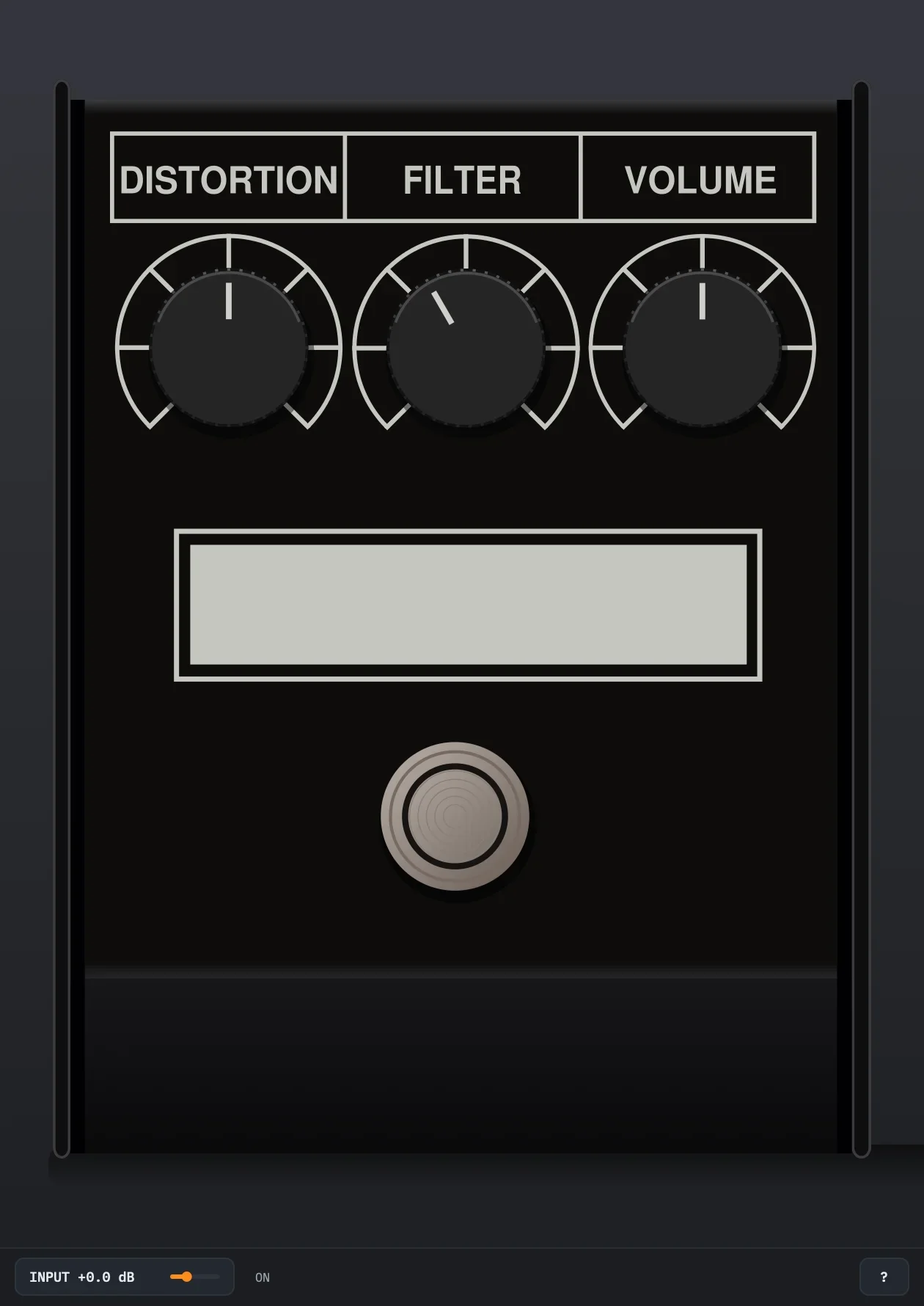
| File | Place | Size |
|---|---|---|
| pr-dist-r-model.svg or .png | The RAT letters, black in the white block | 44.7 × 11.1 mm |
| pr-dist-r-maker.svg or .png | The Pro Co logo beside them | 13.4 × 11.5 mm |
| pr-dist-r-front.svg or .png | The Pro Co Sound Inc logo on the front face | 30.1 × 24.3 mm |
The plain names (model.svg…) in artwork/rat/ or artwork/rat.zip work too, and win over these. Without them the white block is plain.
The pedal
The top of the 1984 small box, measured from photos of 1984 units.
The knobs
- DISTORTION 1: the gain before the clipping diodes.
- FILTER 2: a low-pass after them. Clockwise is darker.
- VOLUME 3: the output level.
Each reads 0 to 10 in the DAW and on its tooltip; the pedal's scale has seven ticks. A new instance has them at 5, 4 and 5.
The footswitch
4 True bypass: off, the track passes through untouched, INPUT included. The 1984 RAT has no LED, so the bottom bar says ON or BYPASSED. Switching crossfades over 5 ms instead of the real switch's click.
The bars
The top bar
- BETA after the name: this version is a beta. About shows the version.
- ROMs: the ROM folder and the artwork, with their full paths, and Show, Change… and Rescan for the folder.
- State: see State.
- About: the version, the ROM folder and artwork in use, the update check, and links to this guide, the site and the forum. A newer version shows as a button in the bar.
State
- Save to file… saves the instance: the knobs, the footswitch and INPUT.
- Load from file… loads one.
- Reset… makes it a new instance: every control at its default.
The bottom bar
- INPUT 1
- A gain in front of the pedal, −12 to +24 dB, default 0 dB, to hit it harder or softer. At 0 dB, 0 dBFS is +4 dBu at the pedal's input (1.74 V peak), about a hot humbucker or a synth's line output. The output isn't made up for it. Drag it sideways or scroll; double-click goes back to 0 dB.
- ON, BYPASSED
- The footswitch, and while a knob is turned, its value.
- ?
- Shows the list of computer keys over the pedal. Any click, ? or Escape closes it.
Your DAW
An effect, mono or stereo: on a stereo track each side has its own pedal, and a mono source played on both sides costs one.
Driving it
A RAT reacts to how hot its input is. In most DAWs the fader comes after the plugin, so it doesn't change that: INPUT does, as do clip gain, a gain plugin before it, or the source's own volume.
Automation and sessions
Five parameters can be automated, in this order: Distortion, Filter, Volume, On, Input. Knob moves glide over a few milliseconds, as a turned pot does.
A session saves them, as State does, with the version of the model it was made with.
On silent input the pedal sleeps and puts out exact zeros; any sound or knob move wakes it. pr-dist-r reports a 1 s tail.
Keyboard and mouse
- Knobs: drag up or down, or scroll; shift is finer, double-click goes back to the default. Hovering shows the value.
- Footswitch: click.
- ? shows the key list; Escape closes it. Click the pedal first.
- Window: drag the bottom-right corner, half to twice the size.