ro-mono-101 user guide
ro-mono-101 runs the SH-101's own program for the keyboard, the sequencer and the arpeggio: what you know from an SH-101 applies here. Installing is on the download page; the ROM folder, artwork files, the update check and contact are on Support.
Getting started
The first start
The program for the keyboard, the sequencer and the arpeggio is in the CPU's 2 KB mask ROM, Roland's copyrighted work, so Lemus doesn't include it. The first time ro-mono-101 starts without it, it asks how to continue.
- I have the ROM (Locate ROM…) takes the ROM image, a zip holding it, or a folder. A file is checked and copied into the ROM folder; a folder becomes the ROM folder. The full SH-101 starts at once, settings kept.
- Use voice mode carries on without it.
The prompt doesn't come back, unless the ROM goes missing after ro-mono-101 has run with it. In voice mode the top bar keeps Add CPU ROM….
The ROM
One optional image, found by checksum under any name anywhere in the ROM folder. MAME has no SH-101 set: the image is the dump published with the SH101_Disassembled project on GitHub, 80C49_SH101.bin there.
| File | What | Without it |
|---|---|---|
| tmp80c49p-6-7301.ic6 | The program: the TMP80C49P-6-7301 CPU's mask ROM (IC6, 2 KB) | Voice mode |
tmp80c49p-6-7301.ic6 · 2,048 bytes · CRC 4d9cb13c
SHA1 a84bb1758582dbb800001db3663eaf3fb9d0e25d
Another image in circulation, Roland_Sh101_8049_ROM.bin (CRC 3e4201c7), is a bad read: from byte 0x0B0 on it holds the low byte of each address instead of code. Lemus doesn't take it.
Voice mode
Without the ROM, ro-mono-101 is the SH-101's synth board, played from MIDI: the same sound, without anything the CPU does.
| With the ROM | Voice mode | |
|---|---|---|
| Sound | The synth board | The same |
| MIDI notes, HOLD pedal, pitch bend, mod wheel | Yes, through the firmware | Yes, with the keyboard's note priority |
| Sliders, knobs, switches, automation | Yes | Yes |
| Sequencer and arpeggio | The original firmware | None |
| Panel keys and buttons | Work as on the unit | No effect |
| SYNC | Yes | No |
| The MODULATOR's RANDOM wave | Steps with the clock | Holds still: the CPU steps it |
A session keeps its sequence in voice mode. Adding the ROM later switches it to the full SH-101, keeping its settings and sequence.
Adding the ROM later
- Click Add CPU ROM… in the top bar (with the ROM in place, the same button is ROMs).
- Put the ROM in the folder shown, or choose your own with Change….
- Click Rescan. ro-mono-101 reloads as the full SH-101.
Panel artwork
The two blank places take an SVG or PNG of your own each, named as below, anywhere in the ROM folder (how artwork files work). ROMs in the top bar lists them with what each has, opens the folder, and reads it again with Rescan.
| File | Place | Size | A sharp PNG |
|---|---|---|---|
| ro-mono-101-maker.svg or .png | Roland logo | 63.5 × 9.7 mm | 559 × 85 px |
| ro-mono-101-model.svg or .png | SH-101, dot matrix | 87.0 × 21.4 mm | 766 × 188 px |
- The plain names (maker.png…) in artwork/sh101/ or artwork/sh101.zip work too, and win over these.
- An sh101.svg, or an SVG in sh101.zip, anywhere in the folder still fills the places without a file: its elements roland and sh101, in panel millimetres from the rear-left corner of the case, as outlines in the print colour.
Your first sound
- From MIDI, in both modes: see MIDI notes.
- From the arpeggio, with the ROM: press UP and hold two or more keys. The MODULATOR's RATE sets the speed, or with SYNC on, the DAW: see Sync.
- From the sequencer, with the ROM: a new instance has no sequence, as on a new unit, so load one first.
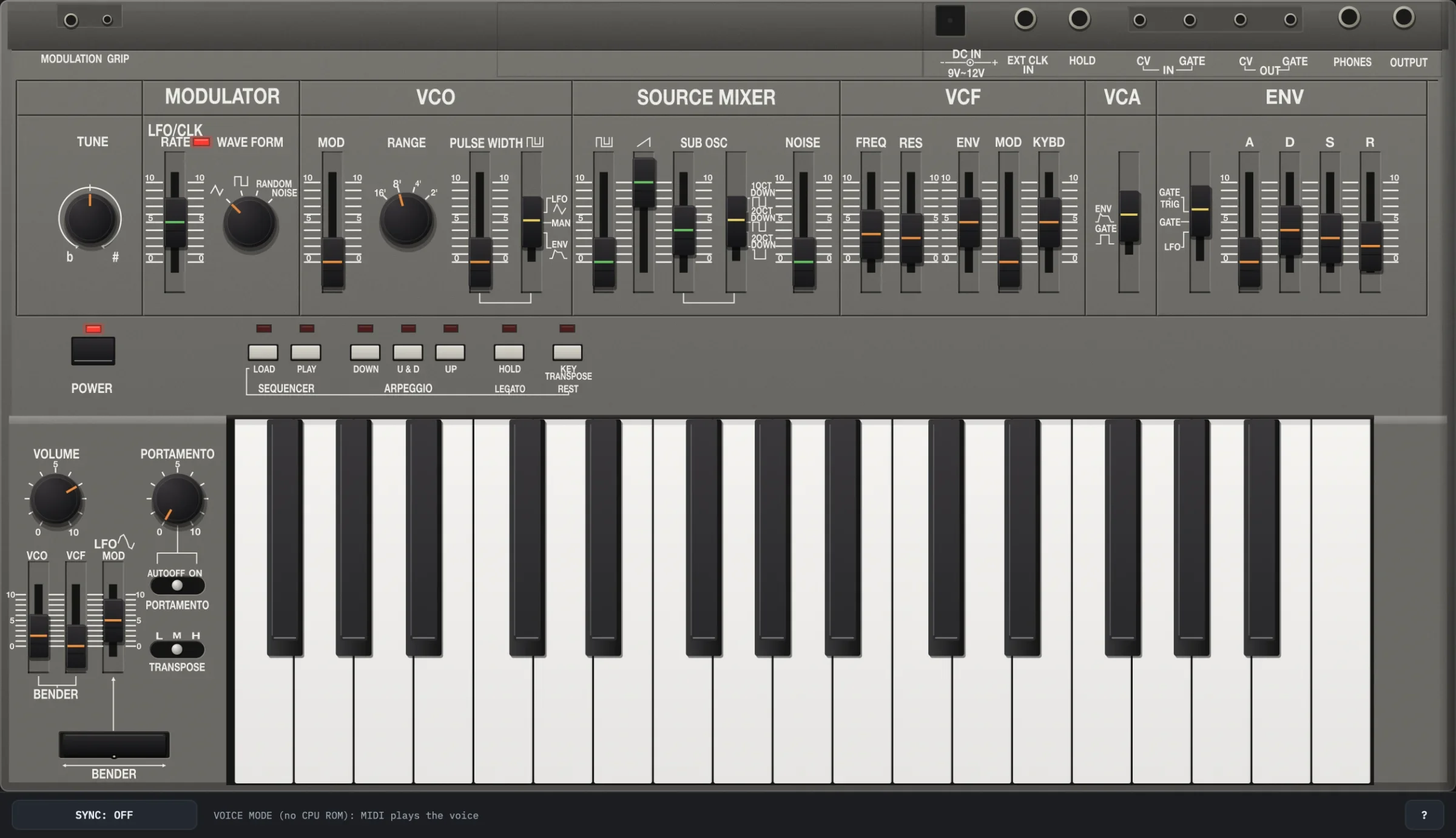
The panel at a glance
Drawn from measurements of a straight-on photo, legends and controls placed to about 0.5 mm.
- 1 TUNE
- Fine tuning, ±64 cents.
- 2 MODULATOR
- LFO/CLK RATE, about 0.08 to 36.4 Hz, and WAVE FORM: triangle, square, RANDOM, NOISE. Its square is the clock for the arpeggio and sequencer while SYNC is off.
- 3 VCO
- MOD, the MODULATOR on the pitch; RANGE, 16' to 2'; PULSE WIDTH and its source: LFO, MAN or ENV.
- 4 SOURCE MIXER
- The levels of the pulse, the saw, the sub-oscillator and NOISE. The SUB OSC switch: a square 1 OCT DOWN, a square 2 OCT DOWN, or a 25 % pulse 2 OCT DOWN.
- 5 VCF
- FREQ, RES, ENV, MOD (the MODULATOR) and KYBD (the keyboard's follow). Near RES 8 the filter starts to oscillate.
- 6 VCA
- ENV, or GATE: open while the gate is on.
- 7 ENV
- The trigger switch, GATE+TRIG, GATE or LFO (see Note priority), and A, D, S and R.
- 8 POWER
- See POWER.
- 9 Buttons
- LOAD and PLAY (SEQUENCER); DOWN, U&D and UP (ARPEGGIO); HOLD (LEGATO while loading); KEY TRANSPOSE (REST while loading). Their LEDs are the firmware's.
- 10 VOLUME, PORTAMENTO
- The output level, and the glide's time.
- 11 PORTAMENTO switch
- ON glides between every note; AUTO only between legato notes, and not in the arpeggio; OFF, the default, not at all.
- 12 TRANSPOSE
- L, M or H: the keyboard an octave down, as it is, or an octave up. PLAY ignores it.
- 13 BENDER sliders
- VCO and VCF: how far the lever bends the pitch and the cutoff. LFO MOD: how much of the MODULATOR the lever's push adds to them.
- 14 BENDER lever
- Drag sideways to bend, forward to push (LFO MOD); it springs back.
- 15 Keys
- 32 keys, F3 to C6: MIDI notes 53 to 84.
- 16 Bottom bar
- SYNC, the status line and ?: see the bottom bar.
The jacks along the top edge are legends only. CV/GATE in and out, EXT CLK IN, PHONES, the MGS-1 grip's own controls and the battery aren't emulated: SYNC stands in for a clock cable, CC 64 for a pedal in HOLD, and the memory always keeps the sequence.
POWER
Off, every LED is dark, keys and notes are ignored and the CPU stops; the sequence is kept. Within a millisecond the output is shunted, a faint thump is left, and after half a second the output is exact zeros. On, the CPU starts afresh and the output is muted while the mute's capacitor charges: a note is held about 30 dB down for the first quarter second, and the output is open after about 1.4 s. The status line says MUTED meanwhile.
A new instance starts switched on, playable at once, and a session always loads switched on.
Playing
Note priority
The firmware scans the keys and sets the priority from the ENV's trigger switch.
- GATE+TRIG: the last key pressed plays, and each new key starts the ENV again. Letting go of it plays the lowest key still held, not the one before.
- GATE: the lowest key held plays. Legato keys change the pitch with no new ENV.
- LFO: the lowest key held plays, and the ENV starts again at the MODULATOR's rate.
In every mode the gate stays on from one held key to the next.
HOLD
HOLD keeps the gate on after the keys are let go; new keys change the pitch under it. Its LED shows it. CC 64 is the HOLD pedal: it holds while down, and letting it go also stops PLAY.
KEY TRANSPOSE
Hold KEY TRANSPOSE and press a key: F3 to B3 transpose down 7 to 1 semitones, C4 back to none, C♯4 to C5 up 1 to 12, and C♯5 to C6 do the same. The key pressed doesn't play.
- It moves the pitch, not the filter's keyboard follow.
- Its LED is lit while a transpose is set.
- It works on held notes, a latched arpeggio and a playing sequence. LOAD cancels it.
The sequencer
Up to 100 steps, each a note, a legato note or a rest, kept in the CPU's memory. A new instance has none, as a new unit; the sequence is saved with the session.
LOAD
- Press LOAD 1. Its LED lights.
- Play one key per step. A step is the key at the TRANSPOSE switch's setting, so the 32 keys cover 56 notes; each key sounds as it is stored.
- For a legato step, hold HOLD (LEGATO) 2 while pressing the key: PLAY plays it with no gap in the gate, a slur, or a tie on the same note.
- For a rest, press KEY TRANSPOSE (REST) 3, once per rest.
- Loading from the start clears the old sequence at the first key or rest.
- LOAD pressed while the sequence plays keeps it, and new steps overwrite from the step after the one playing.
- After step 100 the next key plays without being stored, and leaves LOAD.
- Steps loaded with the ENV's trigger switch on LFO are all legato.
PLAY
- Press PLAY 1 to start; it lights, and each clock steps one step: the MODULATOR's square, or the DAW with SYNC on. PLAY again stops.
- It loops from the last step to the first.
- A note's gate drops for one pass of the program, about 2 ms, at the start of its step; a legato step's doesn't; a rest's is off.
- TRANSPOSE doesn't move it. KEY TRANSPOSE does, and keys alone do nothing.
- HOLD keeps the gate on through every step and rest.
- With the ENV on LFO, the ENV starts again with each clock.
The arpeggio
- DOWN, U&D or UP 1 chooses the pattern; the lit one pressed again turns it off.
- It runs while two or more keys are held, one key per clock; a single key plays as usual.
- U&D plays the top and bottom keys once a turn: C E G C′ G E C E….
- HOLD 2 latches it. Keys added while some are still held join it; a new chord with none held replaces it, and a single key holds that note.
- The gate stays on: with GATE+TRIG each step starts the ENV again, with GATE it runs once, with LFO it follows the MODULATOR.
- TRANSPOSE and RANGE move it at once; KEY TRANSPOSE moves a latched one.
- The MODULATOR restarts with each new chord.
The bars
The top bar
- BETA after the name: this version is a beta. About shows the version.
- VOICE MODE and a line saying what's missing, while ro-mono-101 runs without its ROM.
- ROMs: the ROM folder, the ROM and the artwork, with their full paths, and Show, Change… and Rescan for the folder. In voice mode it reads Add CPU ROM…: see Adding the ROM later.
- State: Save to file… saves the instance, every control and the sequence; Load from file… loads one, the standalone app's saved states too. Reset… makes it a new instance: no sequence, every control at its default.
- About: the version, the ROM folder and artwork in use, the update check, and links to this guide, the site and the forum. A newer version shows as a button in the bar.
The bottom bar
- 1 SYNC
- OFF, or HOST with its step: 1/16 (HOST's default), 1/8, 1/4, 1/32, 1/16T, 1/8T. A click steps to the next, back to OFF after 1/8T; shift-click goes back. See Sync.
- 2 Status line
- The clock, LFO CLOCK or HOST with the DAW's tempo; the key CV and GATE; the VCO's and the VCF's frequencies; the computer keys' octave (OCT). Or POWER OFF, MUTED while the mute holds, voice mode, or a key or button held by a right-click.
- 3 ?
- Shows the list of computer keys over the panel. Any click, ? or Escape closes it.
MIDI and your DAW
MIDI notes
- Notes on any channel press the keys, so the firmware does the note priority, the arpeggio and loading steps. Velocity is ignored.
- Notes 53 to 84 are the 32 keys at the panel's TRANSPOSE. A note beyond them moves TRANSPOSE an octave while it is the newest note; beyond L and H, notes fold by octaves.
- A note started again while its key is down lifts the key first, so the gate drops, as a key pressed again does.
- With an arpeggio button on, a chord arriving all at once is pressed lowest key first (highest for DOWN), so the pattern starts there.
- Pitch bend moves the bender lever, the mod wheel (CC 1) pushes it, and CC 64 is the HOLD pedal. All notes off lets go of every key.
- The arpeggio and sequencer run only when PLAY or an arpeggio button is on, never from MIDI notes alone.
Controllers
After Roland's SH-01A.
| CC | Control | CC | Control | CC | Control |
|---|---|---|---|---|---|
| 3 | LFO RATE | 19 | PULSE level | 27 | BENDER VCF |
| 5 | PORTAMENTO | 20 | SAW level | 28 | VCA mode |
| 12 | LFO waveform | 21 | SUB level | 29 | ENV trigger |
| 13 | VCO MOD | 22 | SUB OSC | 30 | S |
| 14 | RANGE | 23 | NOISE | 31 | Portamento mode |
| 15 | PULSE WIDTH | 24 | VCF ENV | 71 | RES |
| 16 | PWM source | 25 | VCF MOD | 72 | R |
| 17 | BENDER LFO MOD | 26 | KYBD | 73 | A |
| 18 | BENDER VCO | 74 | FREQ | ||
| 75 | D | ||||
| 76 | TUNE | ||||
| 77 | TRANSPOSE |
Sync
SYNC works like a cable in EXT CLK IN.
- SYNC: OFF (the default): the MODULATOR's square clocks the arpeggio and sequencer, as with nothing plugged in.
- SYNC: HOST: the DAW's transport clocks them, a step per 1/16 or the step chosen. The first step falls on the first grid line at or after where the DAW starts. While the DAW is stopped there is no clock, so a running arpeggio or sequence waits.
Automation and sessions
These parameters can be automated, in this order: LFO Rate, LFO Waveform, VCO Mod, VCO Range, Pulse Width, PWM Source, Pulse Level, Saw Level, Sub Osc Level, Noise Level, Sub Osc, VCF Freq, VCF Res, VCF Env, VCF Mod, VCF Kybd, VCA Mode, Attack, Decay, Sustain, Release, Env Trigger, Volume, Tune, Portamento, Portamento Mode, Bend VCO, Bend VCF, Bend LFO Mod, Transpose, Sync to Host and Sync Clock.
A session saves every parameter and the sequence, with the model's version, so that a later change to the sound can keep old projects as they were.
Once a note has died away the voice sleeps: exact zeros, about 0.5 % of a core instead of 4–8 %. A note, the arpeggio or sequencer, a control or the bender wakes it; the CPU and the MODULATOR keep running. ro-mono-101 reports a 36 s tail, RELEASE at maximum. Don't let the DAW suspend it on silent tracks, or the SH-101 can't play its own arpeggio and sequence.
Keyboard and mouse
Computer keys
Click the panel first. Keys stay down while held, so two-key steps work. Letters, numbers and punctuation go by place, as on a US keyboard: on a German (QWERTZ) or French (AZERTY) keyboard, press the key in the same place.
| Keys | Panel |
|---|---|
| A W S E D F T G Y H U J K O L P ; ' | Keys from C up to F |
| Z X | Those keys an octave down, up |
| 1 2 | LOAD, PLAY |
| 3 4 5 | DOWN, U&D, UP |
| 6 | HOLD (LEGATO while loading) |
| 7 | KEY TRANSPOSE (REST while loading) |
| Space | PLAY, in the standalone app (in a DAW, Space is the DAW's) |
| ← → | Bend the lever |
| ↑ | Push the lever (LFO MOD) |
| ? | The key list |
| Escape | Closes the key list and lets go of every key |
Some DAWs keep letter keys for themselves.
Mouse
- Sliders: drag; shift is finer, double-click resets.
- Knobs: drag. Switches: click or drag.
- Bender: drag the lever sideways to bend, forward to push; it springs back.
- Keys and buttons are held while the mouse button is. A right-click (ctrl-click on a Mac) holds one down until it's clicked again, for steps that need two at once, such as HOLD with a key; the status line names it. Escape lets go of all.
- Window: drag the bottom-right corner, half to twice the size.